Browser Use has three routes to an AI browser agent. They are not the same service.
The Python library, CLI and hosted API put different parts of the workflow under your control. Free source code does not mean free model or cloud usage.
In this article
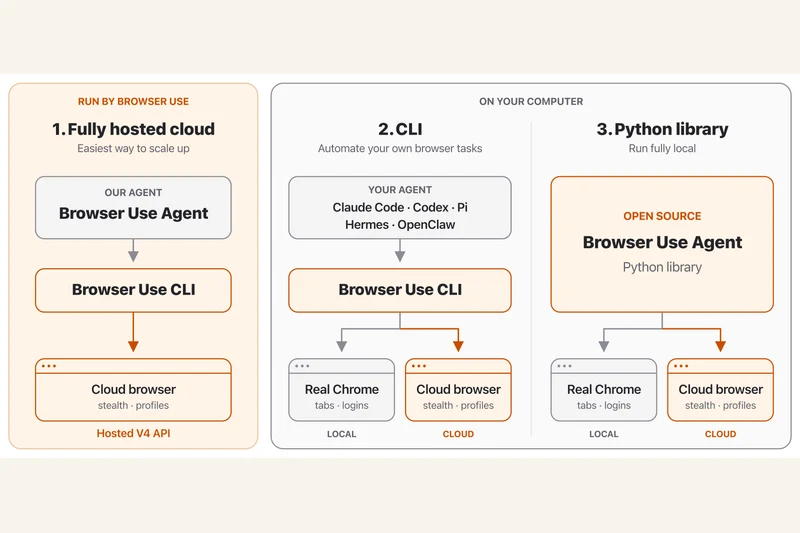
Browser Use's current repository separates three ways to automate browser tasks: a fully hosted cloud service, a CLI for an existing agent and an open-source Python library for applications.
The library lets a developer connect an agent to a model and browser. The documented tasks include opening pages, interacting with forms and extracting information. Those are described capabilities, not a guarantee that an agent will complete any particular website task.
A cloud browser is not a hosted agent
The CLI and Python library can work with local or cloud browsers. A cloud browser hosts the browser itself; the fully hosted API also runs the agent. Choosing between them changes what the developer must operate.
Check the bill before the demo
The Python library is MIT-licensed. Model inference and hosted browser services can still incur separate charges. Connecting a logged-in profile also deserves care because it gives the workflow access to that session.
This documentation-based explainer was checked on 16 October 2026. Auratro has not independently run the workflow or verified the project's benchmark claims.
Sources & further reading
browser-use/browser-use official repository and documentation
Our articles help you explore AI and build practical skills. For a correction or a question, contact us. Contact