Free vs paid AI assistant plans: a comparison for deciding when to upgrade
Compare ChatGPT and Gemini access, usage limits and billing boundaries, then use a simple decision checklist before subscribing.
A free assistant can help you draft an email or examine a document, but a limit may interrupt a longer session. Paying can buy more access; it does not automatically remove every cap or guarantee a correct answer. The useful question is which restriction gets in the way of your actual work, and whether a particular plan addresses it.
This comparison uses the personal-account help pages for ChatGPT and Gemini, checked on 28 November 2026. Plan details, availability and prices can change, so confirm the current offer on the provider’s official page before paying. The aim is to choose a suitable tier, not to rank the quality of answers.
What free and paid plans offer
The table brings together OpenAI’s Free and Plus pages and Google’s Gemini limits page. It compares documented access, not a hands-on measurement. A usage limit is a restriction on how much of a service or feature you can use within a period; the exact rule can differ by tool and account.
| Question | ChatGPT Free and Plus | Gemini without and with a Google AI plan |
|---|---|---|
| Basic access | Free includes chat and tools; Plus offers broader model and tool access. | Google describes standard limits without an AI plan and higher limits on paid plans. |
| Files and images | Free includes uploads and image creation, with separate limits; Plus expands access. | Google says usage depends on the feature and task; some features require a subscription. |
| When a limit is reached | Free shows when a limited tool can be used again; Plus may also have caps. | Gemini notifies users when a limit is close or reached and shows when it refreshes. |
| Billing boundary | OpenAI bills API usage separately from Plus. | Google describes Gemini app upgrades as part of select Google One plans for personal accounts. |
According to OpenAI’s Free FAQ, data analysis, file and image uploads, and image creation each have separate usage limits. A restriction on one does not describe the allowance for every other feature. OpenAI’s Plus page says the paid plan has higher model limits and expanded tools, but its message caps can vary with system conditions. As of 28 November 2026, OpenAI lists Plus at $20 a month; the amount offered to you should be checked before purchase.
Google says Gemini Apps uses compute-based limits: prompt complexity, model and feature choice, and chat length all affect usage. Its help page describes a refresh every five hours until a weekly limit is reached, with limits subject to change. These are different ways of describing allowances, so a message count in one service is not a direct measure of the work available in the other.
Why a higher limit may matter
Imagine you upload several documents to prepare a project brief. If file access stops before the brief is ready, record the notice and the task you could not finish. Waiting could be sufficient if the reset arrives before you need the result. If the same interruption repeatedly blocks a deadline, a plan that raises the relevant allowance may be worth considering. This is a decision example, not a recorded product test.
Do not confuse a usage limit with a context window: the latter is the amount of material a model can consider together in a conversation. Google says exceeding the context window can mean details or connections in the supplied material are missed. OpenAI says both messages and replies occupy space in a ChatGPT conversation. A longer allowance for use and more room in a single conversation solve different problems. Our context window guide explains how to carry work into a new chat.
Nor does a larger window promise that every detail is correctly interpreted. Ask for references to the relevant passages and compare them with the original document. A paid response still needs checking, particularly when the answer informs an important decision. The hallucination checking guide gives a practical way to do that.
Which plan should you choose?
Choose a free tier first if it handles the tasks you actually need and waiting for a reset is acceptable. OpenAI lists web search, file uploads, data analysis and image creation among Free features, so the existence of a task alone does not establish that you need Plus. Try the relevant feature on material you are allowed to share and note any restriction you encounter.
Consider a paid plan when a documented increase in the particular allowance or feature you need justifies its recurring cost. For example, a frequent file user should compare file access, not just the headline chat allowance. Google says some resource-intensive features can be unavailable to users without a Google AI plan during high demand. If reliable access to one such feature matters, read its current availability terms as well as the general plan description.
Choose the plan for the account and product you intend to use. An application programming interface, or API, lets software send requests to a service; it is a separate billing question from an assistant subscription. OpenAI explicitly says API usage is not included in ChatGPT Plus. A developer choosing Plus for the web app should therefore budget for any API use separately, rather than assuming one payment covers both.
A checklist before you subscribe
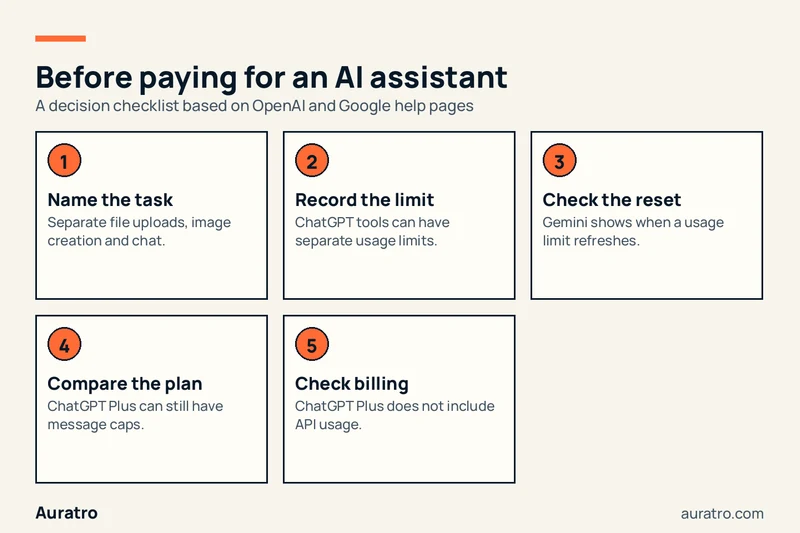
Use this decision checklist with your own tasks. It does not require you to purchase a plan or share private documents with a service. A short record of the interruption is more useful than a vague impression that the assistant feels limited.
- Write down the task and feature: for example, summarising an uploaded file rather than simply chatting.
- Note the notice or restriction, including when the service says you can use the feature again.
- Decide whether waiting or dividing the task into smaller parts meets your deadline without losing necessary context.
- Compare the specific paid feature and allowance with the restriction you recorded; include any remaining caps.
- Check the recurring price, account eligibility and whether the product you need is included before deciding.
- If you subscribe, review later whether that same interruption occurs often enough to justify the cost.
For Gemini, Google’s documented route to view usage is to visit gemini.google.com, then select Settings and Usage Limits at the bottom left. Its notifications also indicate when a limit will refresh. OpenAI says ChatGPT shows applicable limits and reset timing in the product. These observations help distinguish an occasional wait from a recurring obstacle.
Limits and what to check
This comparison covers the cited personal-account documentation, not every business, school or regional offer. Google specifically separates its personal-account guidance from work and school accounts; organisations may have different terms and controls. Features, model choices, usage limits and prices can change, and an offer can depend on availability. Check the provider’s current plan page and the details shown for your account before subscribing.
More access is not a promise of accuracy or confidentiality. Review the provider’s data controls and your organisation’s rules before uploading material, and verify consequential claims against their sources. If the need is simply to continue a full ChatGPT conversation, OpenAI says a Free user can start a new chat; a carried-over summary may omit instructions or exact wording, so paste the essential passage and instructions again.