
AI, practical skills & better ways to workENGLISH EDITION
Stay curious. Make something useful.
Auratro
Auratro/Tools & Workflows

One Caveman test shows why “be concise” belongs in the baseline

A developer's small C# experiment found shorter replies with a two-word instruction. It does not establish a universal saving—or the cost of an entire agent session.
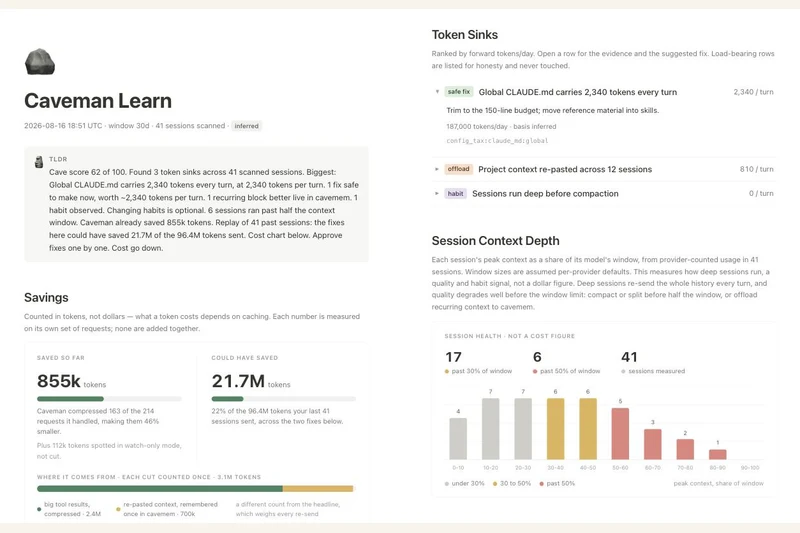
Project-supplied Caveman Learn screenshot with token-usage cards and a session-depth chart; these are product example figures, not Naze Code's test results.
Julius Brussee / Caveman contributors — Apache-2.0
In this article

Image credit clarification: The hero is an unmodified Caveman project screenshot by Julius Brussee / Caveman contributors, licensed under Apache-2.0. It is not a photograph and was not sourced from Unsplash. The screenshot's displayed figures are product example data, not the reported experiment.

A developer writing as Naze Code has published a small comparison of Caveman, an open-source toolkit that aims to reduce the tokens coding agents use. The useful finding is narrower than a headline percentage: in one coding task, asking the agent to be concise already reduced its output substantially.

In the 16 October DEV Community post, the author reports running four variants three times each on a C# dictionary-key bug. Mean output fell from 845 tokens without a brevity instruction to 603 with “Be concise.” The reported averages were 482 for the Caveman rules and 308 for the more aggressive Ultracave mode.

That makes the two-word prompt about 29% shorter than the author's plain baseline, compared with about 43% and 64% for the two skill modes. Those are reported output-token reductions on that task, not independently established performance figures for coding agents generally.

A small experiment with important limits

Three runs on one problem cannot establish how a prompt performs across models, languages or long projects. The article describes a single model but does not clearly name it in the methodology. Auratro has not reproduced the experiment, inspected its raw runs or independently checked the claimed correctness of the returned fixes.

The post also estimates the input overhead of sending the skill instructions. That overhead matters when comparing total usage: a shorter answer can still come after a longer prompt. Prompt caching and how often instructions are sent can change the accounting, so the author's break-even estimate should not be treated as a universal rule.

Output savings and input compression answer different questions

Caveman's current README distinguishes shorter replies from compressing material before a model reads it. It also includes a concise-prompt baseline and warns that its reported session-compression results come from a particular evaluation setup. Those figures measure different workloads and token categories; they should not be combined into a single promised saving.

For a useful comparison on your own work, keep the task and model settings fixed, count input and output separately, and check whether the answer still satisfies the task. Include an ordinary brevity instruction as a baseline before attributing every reduction to an installed toolkit. These are evaluation suggestions, not a tutorial Auratro has tested.

Image: the project-supplied Caveman Learn interface screenshot shows product example data. Its displayed numbers are not the results of Naze Code's experiment. Screenshot copyright Julius Brussee / Caveman contributors, reproduced unmodified under Apache-2.0; source and licence are linked below.

Sources & further reading

Naze Code's 16 October 2026 single-task comparison and stated methodology

Caveman project README: separate output, input and session claims; accessed 16 October

Caveman screenshot source

Apache License 2.0 and project licensing scope

From Auratro Editorial

Our articles help you explore AI and build practical skills. For a correction or a question, contact us. Contact
Keep reading

NEXT STORY Tools

Browser Use has three routes to an AI browser agent. They are not the same service.

The Python library, CLI and hosted API put different parts of the workflow under your control. Free source code does not mean free model or cloud usage.

Auratro EditorialOpen this article
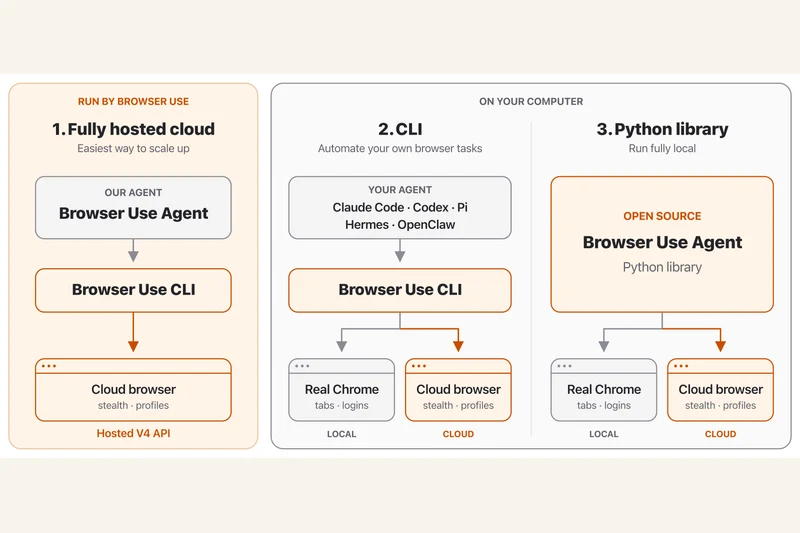
Official Browser Use diagram comparing the hosted cloud agent, CLI and Python library with local and cloud browser connections.
Browser Use contributors / Gregor Zunic (MIT); original project diagram, rasterized from SVG

Image credit clarification: The hero is an official Browser Use project diagram credited to its contributors / Gregor Zunic under the MIT licence. The source SVG was rasterized for display. It is not a photograph and was not sourced from Unsplash.

Browser Use's current repository separates three ways to automate browser tasks: a fully hosted cloud service, a CLI for an existing agent and an open-source Python library for applications.

The library lets a developer connect an agent to a model and browser. The documented tasks include opening pages, interacting with forms and extracting information. Those are described capabilities, not a guarantee that an agent will complete any particular website task.

A cloud browser is not a hosted agent

The CLI and Python library can work with local or cloud browsers. A cloud browser hosts the browser itself; the fully hosted API also runs the agent. Choosing between them changes what the developer must operate.

Check the bill before the demo

The Python library is MIT-licensed. Model inference and hosted browser services can still incur separate charges. Connecting a logged-in profile also deserves care because it gives the workflow access to that session.

This documentation-based explainer was checked on 16 October 2026. Auratro has not independently run the workflow or verified the project's benchmark claims.

Sources & further readingbrowser-use/browser-use official repository and documentationProject MIT licence and copyright notice
NEXT STORY AI News

Cloudflare says bots moved providers after the Yandex disruption

Its 14 October analysis found matching request patterns elsewhere. A traffic drop at one network did not establish that the activity had stopped.

Auratro EditorialOpen this article
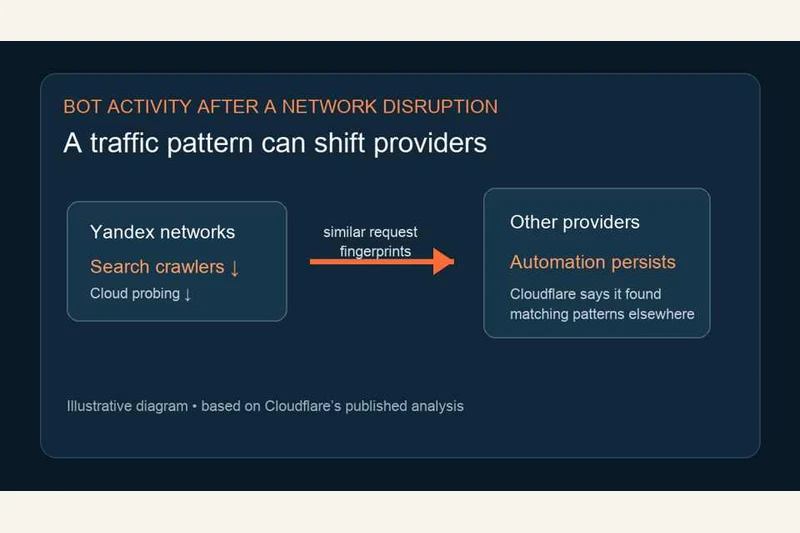
Auratro's explanatory diagram shows falling activity at Yandex networks and similar request fingerprints at other providers; it is not a measured traffic chart.
Auratro

Image credit clarification: The hero is an original Auratro explanatory diagram based on Cloudflare's reported analysis. It is not a photograph, a measured traffic chart or an Unsplash image.

Cloudflare says a sharp decline in traffic from Yandex networks did not mean that all the automated activity had disappeared. In an analysis published on 14 October, it reported finding matching request patterns at other hosting providers.

The company distinguished verified search crawling from scanning and probing associated with cloud-hosted traffic. Some requests it tracked elsewhere shared technical characteristics, including TLS fingerprints, unusual paths and headers, and custom user-agent strings.

A hosting change can hide the same pattern

For website operators, the useful distinction is between a network going quiet and an activity ending. Cloudflare's account describes the former without establishing the latter.

What the evidence cannot tell us

The findings reflect traffic visible to Cloudflare, not a complete census of the internet. Similar fingerprints are investigative clues; they do not establish who operated every request or its purpose.

Auratro has not independently reproduced the analysis. The accompanying original diagram explains the reported relationship; it is not a data chart or a photograph of an attack.

Sources & further readingCloudflare's 14 October 2026 analysis of Yandex traffic and bot migration