
AI, practical skills & better ways to workENGLISH EDITION
Stay curious. Make something useful.
Auratro
Auratro/Tools & Workflows

This open-source bridge syncs Google Tasks and Microsoft To Do—with limits

Tasks–To Do Sync runs in your own Google Apps Script project. Its account requirements, scheduled updates and deletion behavior deserve a look before you connect real task lists.
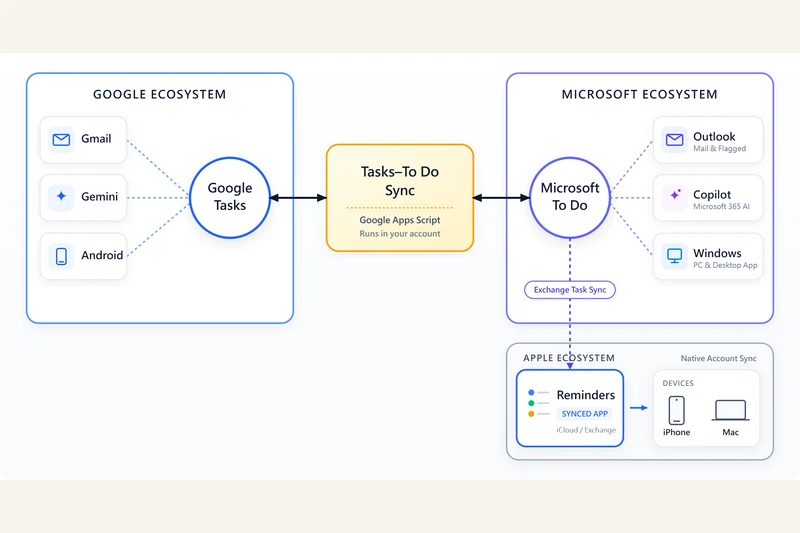
Official Tasks–To Do Sync diagram: Google Tasks connects through a Google Apps Script bridge to Microsoft To Do; surrounding Google, Microsoft and Apple apps are shown through existing native integrations.
Simon Chai / Tasks–To Do Sync — MIT
In this article

Tasks–To Do Sync is an open-source project that connects Google Tasks and Microsoft To Do through a user's own Google Apps Script installation. Its maker, writing as simonchai-tw, described the project in a 16 October DEV Community post. The practical appeal is a shared task workflow across two services without a separate synchronization company hosting the task database.

The repository says it supports creating and editing tasks in either direction, completing and reopening them, notes, eligible lists, and other parts of the task lifecycle. This is a documentation-based overview checked on 16 October; Auratro has not installed it, connected accounts or independently tested synchronization.

Scheduled sync, with account and scale limits

The documented trigger runs every ten minutes. The project says ordinary changes normally arrive within that interval, while guarded operations can take another cycle. That is a stated operating expectation, not a real-time delivery guarantee.

The guided Microsoft sign-in flow is for personal accounts. According to the README, work and school accounts need the more involved self-managed Azure or Entra setup. The project recommends roughly 300 synchronized task pairs as a conservative operating range and describes 600 as an observed stress boundary, not a support promise.

Time and deletion do not map perfectly

The project documents a notes-marker convention to carry time-of-day information into the Google Tasks side, alongside an optional dedicated-calendar projection. Its current defaults enable that calendar projection, so connecting the tool can create calendar events as well as synchronize tasks.

Deletion and list moves are also enabled by default in the documented configuration. The maker describes confirmation rounds, live checks and recovery records intended to reduce accidental or duplicate changes. Those safeguards are the project's design claims; a test count in its README does not establish that every account or failure case is safe.

Self-hosted still means granting account access

The project says it runs inside a private Apps Script project and talks to Google Tasks and Microsoft Graph APIs rather than operating its own hosted sync service. Google and Microsoft still process the requests, and the installation needs permissions for the resources it uses.

The README identifies Google Tasks, a dedicated secondary calendar and alert email among those resources. On the Microsoft side it identifies To Do access and a mailbox-settings permission for the account's time zone. Its detect command can also temporarily read other Apps Script projects visible to the account to identify existing installations.

The repository uses the MIT licence. That makes the source available to inspect and adapt, but does not remove account authorization or maintenance responsibilities. Before trying any two-way synchronization tool, read its current permission list, defaults, rollback guidance and supported-account requirements, and preserve important task data. This article is not a tested setup guide or a recommendation to bypass a consent or security warning.

Image: the unmodified project-supplied diagram illustrates the direct Google Tasks–Microsoft To Do bridge. Its surrounding app connections describe native integrations; Auratro has not tested those workflows. Copyright (c) 2026 Simon Chai, reproduced under the MIT licence; original asset and full licence linked below.

Sources & further reading

Maker's 16 October announcement

Tasks–To Do Sync README: capabilities, defaults and operating limits

Project security model and incident guidance

MIT licence — copyright 2026 Simon Chai

Original project workflow diagram

From Auratro Editorial

Our articles help you explore AI and build practical skills. For a correction or a question, contact us. Contact
Keep reading

NEXT STORY Tools

Browser Use has three routes to an AI browser agent. They are not the same service.

The Python library, CLI and hosted API put different parts of the workflow under your control. Free source code does not mean free model or cloud usage.

Auratro EditorialOpen this article
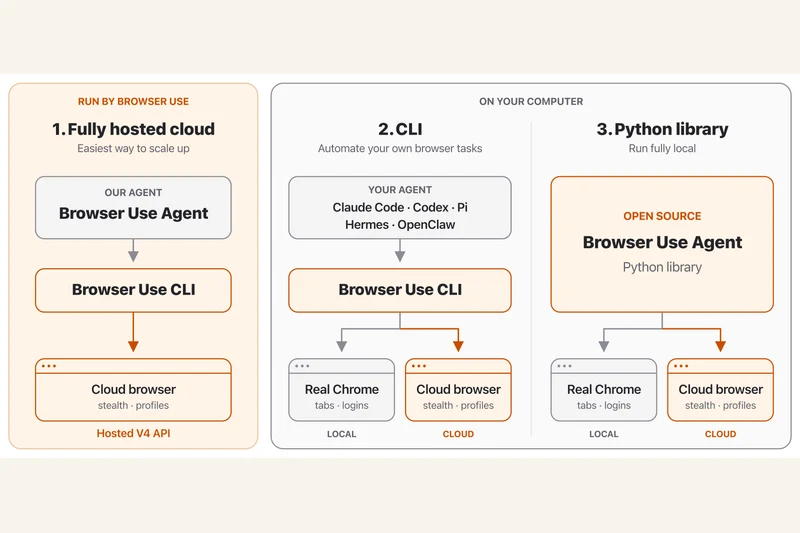
Official Browser Use diagram comparing the hosted cloud agent, CLI and Python library with local and cloud browser connections.
Browser Use contributors / Gregor Zunic (MIT); original project diagram, rasterized from SVG

Image credit clarification: The hero is an official Browser Use project diagram credited to its contributors / Gregor Zunic under the MIT licence. The source SVG was rasterized for display. It is not a photograph and was not sourced from Unsplash.

Browser Use's current repository separates three ways to automate browser tasks: a fully hosted cloud service, a CLI for an existing agent and an open-source Python library for applications.

The library lets a developer connect an agent to a model and browser. The documented tasks include opening pages, interacting with forms and extracting information. Those are described capabilities, not a guarantee that an agent will complete any particular website task.

A cloud browser is not a hosted agent

The CLI and Python library can work with local or cloud browsers. A cloud browser hosts the browser itself; the fully hosted API also runs the agent. Choosing between them changes what the developer must operate.

Check the bill before the demo

The Python library is MIT-licensed. Model inference and hosted browser services can still incur separate charges. Connecting a logged-in profile also deserves care because it gives the workflow access to that session.

This documentation-based explainer was checked on 16 October 2026. Auratro has not independently run the workflow or verified the project's benchmark claims.

Sources & further readingbrowser-use/browser-use official repository and documentationProject MIT licence and copyright notice
NEXT STORY Tools

One Caveman test shows why “be concise” belongs in the baseline

A developer's small C# experiment found shorter replies with a two-word instruction. It does not establish a universal saving—or the cost of an entire agent session.

Auratro EditorialOpen this article
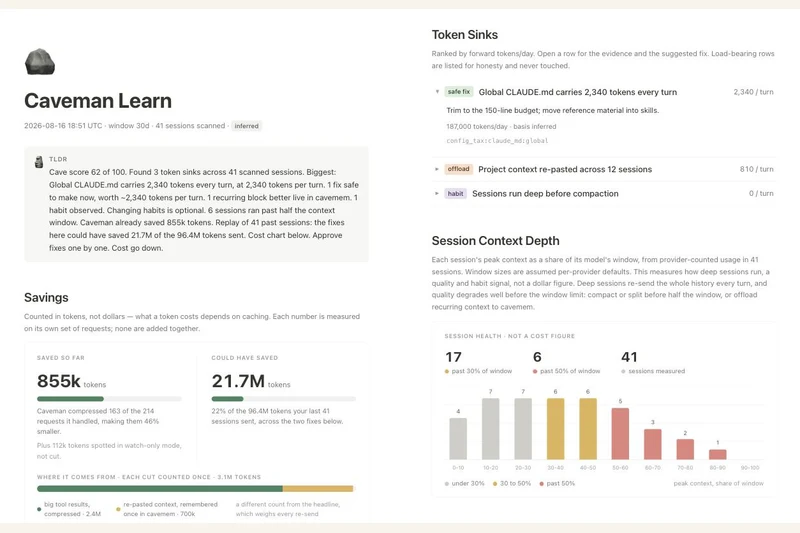
Project-supplied Caveman Learn screenshot with token-usage cards and a session-depth chart; these are product example figures, not Naze Code's test results.
Julius Brussee / Caveman contributors — Apache-2.0

Image credit clarification: The hero is an unmodified Caveman project screenshot by Julius Brussee / Caveman contributors, licensed under Apache-2.0. It is not a photograph and was not sourced from Unsplash. The screenshot's displayed figures are product example data, not the reported experiment.

A developer writing as Naze Code has published a small comparison of Caveman, an open-source toolkit that aims to reduce the tokens coding agents use. The useful finding is narrower than a headline percentage: in one coding task, asking the agent to be concise already reduced its output substantially.

In the 16 October DEV Community post, the author reports running four variants three times each on a C# dictionary-key bug. Mean output fell from 845 tokens without a brevity instruction to 603 with “Be concise.” The reported averages were 482 for the Caveman rules and 308 for the more aggressive Ultracave mode.

That makes the two-word prompt about 29% shorter than the author's plain baseline, compared with about 43% and 64% for the two skill modes. Those are reported output-token reductions on that task, not independently established performance figures for coding agents generally.

A small experiment with important limits

Three runs on one problem cannot establish how a prompt performs across models, languages or long projects. The article describes a single model but does not clearly name it in the methodology. Auratro has not reproduced the experiment, inspected its raw runs or independently checked the claimed correctness of the returned fixes.

The post also estimates the input overhead of sending the skill instructions. That overhead matters when comparing total usage: a shorter answer can still come after a longer prompt. Prompt caching and how often instructions are sent can change the accounting, so the author's break-even estimate should not be treated as a universal rule.

Output savings and input compression answer different questions

Caveman's current README distinguishes shorter replies from compressing material before a model reads it. It also includes a concise-prompt baseline and warns that its reported session-compression results come from a particular evaluation setup. Those figures measure different workloads and token categories; they should not be combined into a single promised saving.

For a useful comparison on your own work, keep the task and model settings fixed, count input and output separately, and check whether the answer still satisfies the task. Include an ordinary brevity instruction as a baseline before attributing every reduction to an installed toolkit. These are evaluation suggestions, not a tutorial Auratro has tested.

Image: the project-supplied Caveman Learn interface screenshot shows product example data. Its displayed numbers are not the results of Naze Code's experiment. Screenshot copyright Julius Brussee / Caveman contributors, reproduced unmodified under Apache-2.0; source and licence are linked below.

Sources & further readingNaze Code's 16 October 2026 single-task comparison and stated methodologyCaveman project README: separate output, input and session claims; accessed 16 OctoberCaveman screenshot sourceApache License 2.0 and project licensing scope