
AI, practical skills & better ways to workENGLISH EDITION
Stay curious. Make something useful.
Auratro
Auratro/Growth

A simple encrypted-photo app went from $66 to about $2,000 a day in six months

As the founder tells it, there were no ads and no viral videos: just AI-written web guides and a paywall most people hit weeks after installing.

AI-generated illustration, not a documentary photo: a glass iPhone standing upright opens like a bank-vault door and pours a waterfall of golden coins onto a dark floor. Used as a visual metaphor for an encrypted photo-storage app reported to earn about $2,000 a day. No real person, product or event is depicted.
AI-generated illustration by Auratro
In this article

A founder who had spent his career in business software had never shipped a mobile app. In about three weeks he built his first one, mostly by directing coding agents. Six months later, he says it was earning roughly $2,000 a day.

The app itself is almost boring on purpose. It is an encrypted storage app for photos and files, close in use to a cloud drive but locked with a pattern on the phone. Everything is encrypted on the device, there are no servers and no shared keys, and the founder says he cannot see or recover what a user stores.

The numbers, as the founder states them

In the first month, the app made $66. Six months in, it was bringing in about $41,000 in a single month, with daily revenue hovering near $2,000 and roughly 2,000 to 3,000 downloads a day. The founder says it passed 60,000 total downloads.

Pricing is deliberately cheap: a weekly plan at $1.99, an annual plan at $19.99 and a one-off lifetime unlock at $39.99. He says most buyers choose the lifetime option, which accounts for the large majority of revenue even though the monthly recurring number looks small. Only about 5.5% of downloads convert on day one, but conversion keeps rising for weeks, with the best rates around day 35.

How he grew it: AI-written guides, not ads

The growth did not come from paid ads or short-video stunts. It came from a plain website and a stream of search-friendly guides that answer questions like how to keep photos private on an iPhone. The founder says he did not write the site copy himself; coding agents produced the pages, the text and the internal links.

His routine is a keyword loop. Every morning an agent checks a keyword tool for search terms where the site appears but gets few clicks, picks the useful ones, drafts a guide around them, and links it from pages that already get traffic. He publishes about one guide a day. The web now sends most of the app's visitors, and he estimates around 10% of those visitors convert to a download.

The AI tools behind it

The stack is small. The app is native Swift; there is no separate backend to keep alive. For the marketing engine he leans on Codex and Claude; he describes the daily guide almost as an agent waking up and running a task on its own. He also mentions an open-source command-line toolkit he wrote that ties Google search and keyword tools into that workflow, and a free analytics tool for measurement.

What to take from it

The useful lesson is not a prompt or a weekend hack. It is that a simple, proven app category plus a patient, low-volume content system can compound: cheap price, late conversion, steady search traffic. He did not need a brand-new idea; he needed to ship and then keep answering the questions customers already typed into a search box.

There are real caveats. Every figure here is self-reported in a promotional case-study interview and has not been independently audited. Search-driven growth is slow and depends on one platform's ranking; the founder himself notes the older apps he competes with sell far more. Results like these are not typical and are not a promise that anyone repeating the steps will match them.

Main source: Starter Story's 18 October 2026 case-study episode, which reports the founder's own figures and dashboard shots. Auratro has not tested the app or verified its income.

Sources & further reading

Starter Story case study, 18 October 2026: 'This app is making $2,000 PER DAY'

From Auratro Editorial

Our articles help you explore AI and build practical skills. For a correction or a question, contact us. Contact
Keep reading

NEXT STORY Tools

Browser Use has three routes to an AI browser agent. They are not the same service.

The Python library, CLI and hosted API put different parts of the workflow under your control. Free source code does not mean free model or cloud usage.

Auratro EditorialOpen this article
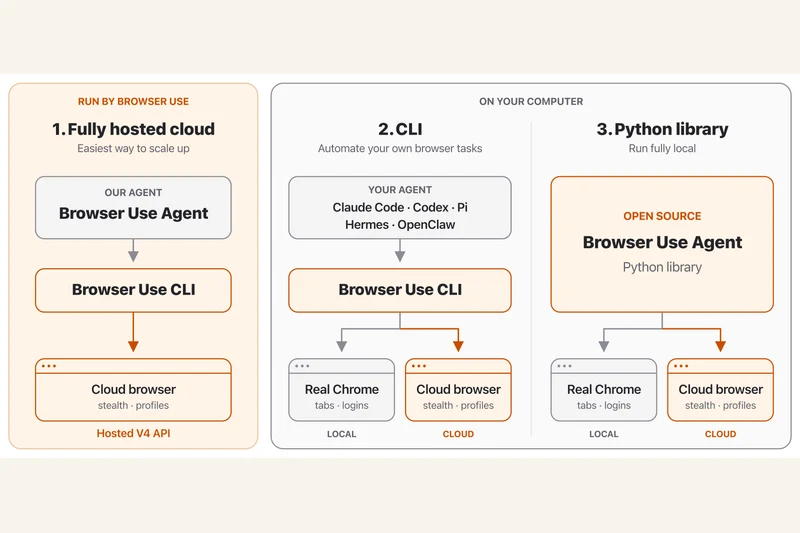
Official Browser Use diagram comparing the hosted cloud agent, CLI and Python library with local and cloud browser connections.
Browser Use contributors / Gregor Zunic (MIT); original project diagram, rasterized from SVG

Image credit clarification: The hero is an official Browser Use project diagram credited to its contributors / Gregor Zunic under the MIT licence. The source SVG was rasterized for display. It is not a photograph and was not sourced from Unsplash.

Browser Use's current repository separates three ways to automate browser tasks: a fully hosted cloud service, a CLI for an existing agent and an open-source Python library for applications.

The library lets a developer connect an agent to a model and browser. The documented tasks include opening pages, interacting with forms and extracting information. Those are described capabilities, not a guarantee that an agent will complete any particular website task.

A cloud browser is not a hosted agent

The CLI and Python library can work with local or cloud browsers. A cloud browser hosts the browser itself; the fully hosted API also runs the agent. Choosing between them changes what the developer must operate.

Check the bill before the demo

The Python library is MIT-licensed. Model inference and hosted browser services can still incur separate charges. Connecting a logged-in profile also deserves care because it gives the workflow access to that session.

This documentation-based explainer was checked on 16 October 2026. Auratro has not independently run the workflow or verified the project's benchmark claims.

Sources & further readingbrowser-use/browser-use official repository and documentationProject MIT licence and copyright notice
NEXT STORY Tools

One Caveman test shows why “be concise” belongs in the baseline

A developer's small C# experiment found shorter replies with a two-word instruction. It does not establish a universal saving—or the cost of an entire agent session.

Auratro EditorialOpen this article
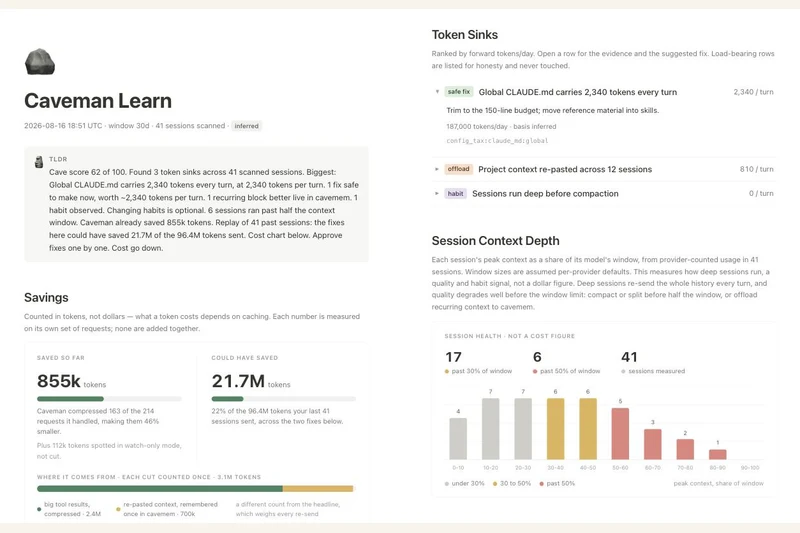
Project-supplied Caveman Learn screenshot with token-usage cards and a session-depth chart; these are product example figures, not Naze Code's test results.
Julius Brussee / Caveman contributors — Apache-2.0

Image credit clarification: The hero is an unmodified Caveman project screenshot by Julius Brussee / Caveman contributors, licensed under Apache-2.0. It is not a photograph and was not sourced from Unsplash. The screenshot's displayed figures are product example data, not the reported experiment.

A developer writing as Naze Code has published a small comparison of Caveman, an open-source toolkit that aims to reduce the tokens coding agents use. The useful finding is narrower than a headline percentage: in one coding task, asking the agent to be concise already reduced its output substantially.

In the 16 October DEV Community post, the author reports running four variants three times each on a C# dictionary-key bug. Mean output fell from 845 tokens without a brevity instruction to 603 with “Be concise.” The reported averages were 482 for the Caveman rules and 308 for the more aggressive Ultracave mode.

That makes the two-word prompt about 29% shorter than the author's plain baseline, compared with about 43% and 64% for the two skill modes. Those are reported output-token reductions on that task, not independently established performance figures for coding agents generally.

A small experiment with important limits

Three runs on one problem cannot establish how a prompt performs across models, languages or long projects. The article describes a single model but does not clearly name it in the methodology. Auratro has not reproduced the experiment, inspected its raw runs or independently checked the claimed correctness of the returned fixes.

The post also estimates the input overhead of sending the skill instructions. That overhead matters when comparing total usage: a shorter answer can still come after a longer prompt. Prompt caching and how often instructions are sent can change the accounting, so the author's break-even estimate should not be treated as a universal rule.

Output savings and input compression answer different questions

Caveman's current README distinguishes shorter replies from compressing material before a model reads it. It also includes a concise-prompt baseline and warns that its reported session-compression results come from a particular evaluation setup. Those figures measure different workloads and token categories; they should not be combined into a single promised saving.

For a useful comparison on your own work, keep the task and model settings fixed, count input and output separately, and check whether the answer still satisfies the task. Include an ordinary brevity instruction as a baseline before attributing every reduction to an installed toolkit. These are evaluation suggestions, not a tutorial Auratro has tested.

Image: the project-supplied Caveman Learn interface screenshot shows product example data. Its displayed numbers are not the results of Naze Code's experiment. Screenshot copyright Julius Brussee / Caveman contributors, reproduced unmodified under Apache-2.0; source and licence are linked below.

Sources & further readingNaze Code's 16 October 2026 single-task comparison and stated methodologyCaveman project README: separate output, input and session claims; accessed 16 OctoberCaveman screenshot sourceApache License 2.0 and project licensing scope