Why AI hallucinates and five checks to catch unsupported answers
A fluent answer can mix accurate details with invented ones. Use this claim-by-claim method to find what the evidence actually supports.
In this article
You ask an AI assistant to summarise a document. Its answer sounds assured and includes a citation, but the cited passage does not say what the answer claims. That is a reason to stop before copying the summary into your work.
An AI hallucination is a plausible but false generated statement. OpenAI describes these errors in its help documentation. The five checks below combine their explanations with Google's account of grounding. Product features change, so confirm current options in the relevant official documentation.
Why a confident answer can be wrong
A large language model is a system trained on large amounts of data to work with language and generate text. OpenAI explains that ChatGPT produces responses based on patterns in its training data and can still generate incorrect or misleading information. A sentence can therefore follow familiar language patterns without its specific factual detail being correct. Fluent wording is useful for reading, but it is not evidence that a claim has been checked.
OpenAI notes that an answer can sound confident even when it is wrong. The tone of an answer does not establish how well it is supported. An ambiguous question, missing material or a mistaken interpretation of a document can also leave an answer unsupported. The practical response is to separate what the answer says from what the available evidence establishes.
A clear request helps define the task. For a reusable way to specify the material and output, see the five-part AI prompt template. Even a carefully worded prompt does not turn generated text into a verified source.
Five checks before using an answer
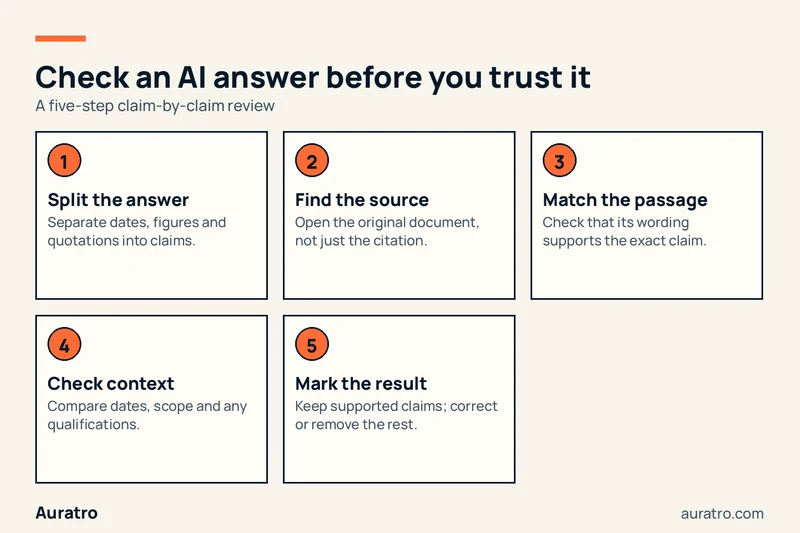
Use this method on claims that matter to the task. It combines OpenAI's advice to visit sources with Anthropic's description of citations into a manual check. The aim is to make the evidence visible to the person using the answer, not to ask the assistant to award itself a reliability score.
- Split the answer into claims. List each date, number, quotation and factual assertion separately. A sentence with two assertions needs two checks.
- Find the original source. Open the cited document or locate an authoritative source independently. If a link is missing or leads nowhere, mark the claim unverified.
- Match the exact passage. Read the relevant text and ask whether it supports the specific assertion. A real document can still be cited for something it does not say.
- Check the context. Compare the date, subject, conditions and scope of the passage with the answer. Look for qualifications that the summary dropped.
- Record the result. Keep supported claims, correct claims contradicted by the source and label claims without sufficient evidence unverified. Remove unsupported detail if it is not needed.
Keep a short record beside the draft: claim, source passage and result. That makes it possible to revisit a decision without repeating the search. For an answer based on a supplied file, record the section or page as well as the file name. A source that supports one sentence does not automatically support its neighbours.
Worked example: checking a document summary
Suppose a fictional community library supplies a notice saying that its reading room closes on Fridays for maintenance. It says nothing about other days. You ask an assistant to summarise opening arrangements. The following is an illustrative example written by Auratro, not a recorded answer from an AI tool: 'The reading room is closed every Friday and open on all other days.'
Separate that answer into two claims. The Friday closure is supported by the notice. The assertion that the room is open on all other days is unverified: the notice does not establish that schedule. Its absence from the notice is not proof that the room is closed on those days either. A safe summary says the notice reports a Friday closure and does not specify the other days.
Now imagine that the assistant points to the correct notice as its citation. The link helps you find the material, but it does not make both claims true. Read the passage yourself and preserve its limits. If the full schedule matters, find a current schedule from the library or ask it directly; until then, leave the other days unresolved.
Grounding and citations help, with limits
Google Cloud defines grounding as connecting model output to verifiable information sources, such as supplied documents or retrieved material. Google says grounding reduces the likelihood of factual hallucinations. It gives the model material to draw on and gives a reader something to inspect, but a connection to a source is not the same as a human finding that every statement is supported.
Anthropic describes citations as a way to connect answers to passages in supplied documents so readers can verify them. OpenAI recommends checking important information and visiting source links directly. You can ask for a source passage alongside each claim and tell the assistant to say when the material does not answer the question. Then compare the passages with the original document, including the surrounding text.
Common mistakes and myths
Myth: confident language means the model knows. OpenAI describes hallucinations as plausible false statements, including confident errors. Treat certainty in the prose as a writing characteristic, not as a measurement of truth. Ask what source supports the claim and examine it.
Myth: an answer with a citation has been verified. A citation can identify a document, while the answer may misread it or extend its conclusion. Check the exact passage and its scope. Equally, an answer without an available source is not automatically false; it remains unverified until you have suitable evidence.
Mistake: asking the same assistant to confirm itself and stopping there. A second response can help identify claims to investigate, but agreement alone is not independent evidence. Compare the claim with a source that can establish it. If the source contradicts the answer, use the source's actual wording and conditions when correcting the summary.
What to do with this
For your next document summary, provide the relevant text and ask for a compact audit trail. The example prompt below is a starting point, not a guarantee of accuracy. Replace the bracketed material with a document you are allowed to share, and avoid including information you should not send to the service.
Summarise the document below using only its contents.
For each factual claim, identify the relevant section and provide a short exact supporting passage.
If the document does not answer a question, say so. Do not fill gaps with assumptions.
[Insert document or permitted excerpt] ```
Run the five checks on the result before sharing it. If the document is long, divide the work into manageable parts and preserve section references; the context window guide explains why the material available to a model matters. For a document you cannot inspect, keep consequential claims unverified rather than presenting them as established.
Limits and what to check
This method checks claims against available evidence; it cannot guarantee that a source is correct, complete or current. A source may itself contain an error, and a passage can support a claim only within its stated scope. Where sources disagree, retain the disagreement and investigate their dates, methods and subject matter rather than choosing the answer that sounds most confident.
Access to documents, citations and search varies by product and version. Confirm current capabilities and any sharing rules in the official documentation before using a workflow. For decisions with serious consequences, use authoritative evidence and appropriate qualified help; do not rely on an unchecked generated answer.
Sources & further reading
Written by the Auratro desk with AI assistance and checked against the sources listed above before publication. See how we work, or report an error. Editorial policy · Contact