How to proofread and tighten writing with AI while keeping your voice
Use separate editing passes, a reusable prompt and a side-by-side check to keep control of your words and meaning.
In this article
A polished rewrite can be less useful than the messy original if it changes a promise or removes the phrase that sounds like you. To proofread with AI while keeping your voice, ask for a narrow edit, inspect the proposed changes and make the final choices yourself. Work on structure, errors and concision in separate passes.
This method adapts guidance from Google and Anthropic into a reusable editing routine. It works with a text-based AI assistant; the examples below are instructions you can adapt, not a record of a product test. Interfaces and data policies vary, so check your chosen tool's current guidance before sharing a draft.
Decide what must stay yours
Voice is the pattern of choices that makes a piece sound like its writer: word choice, rhythm, level of formality and the way it addresses readers. Choose two or three traits you actually want to keep, such as conversational sentences and a dry aside. Mark a phrase that carries your meaning or sounds distinctly like you. These are editing instructions, not a guarantee the assistant will follow them.
Tell the assistant who will read the piece and what you want the reader to do. Google's technical writing guidance recommends identifying an audience, document type and goal in a prompt. Anthropic's Claude Opus 4.8 guidance suggests specifying a desired tone and revisiting style instructions when model behaviour changes. A short sample of your own writing can demonstrate the tone you want, provided you have permission to share it.
Keep a separate copy of the original. That gives you a reference when an edit sounds smoother but quietly changes a qualification. If the draft contains private material, remove it or use an approved tool; the chatbot privacy checklist helps you decide what to leave out.
How to edit in five passes
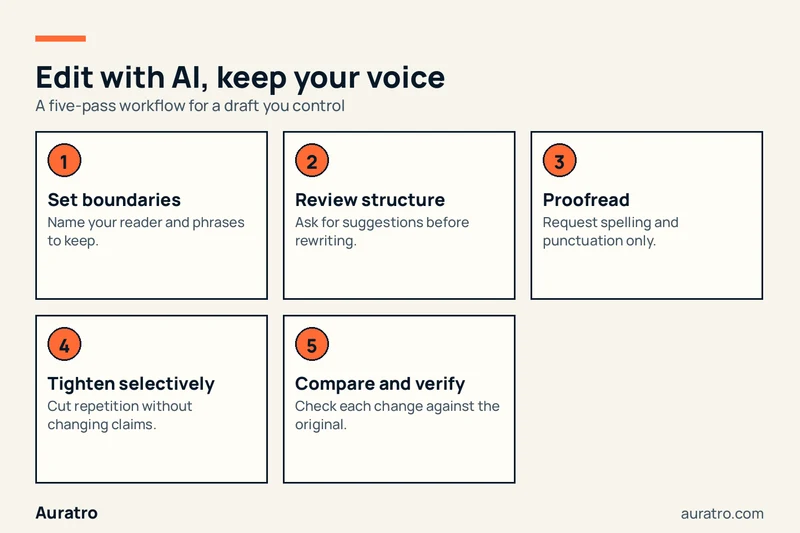
The workflow below is an editorial method built from the sources, not a product-specific menu tutorial. Open a text assistant of your choice and use its normal message field. Google recommends dealing with organisation before grammar and style; its guide also warns that generated responses can contain errors. Apply the following steps to a short section first.
- Save an untouched copy of the draft. Identify its audience, purpose and any wording, claims or qualifications that must stay.
- Ask for an organisation review. Request a list of confusing transitions or misplaced paragraphs, without a rewrite. Decide which suggestions fit your purpose.
- Request a proofreading pass for spelling, punctuation and grammar only. Ask for each proposed correction with its reason, so you can reject a change that is deliberate.
- Ask for a separate tightening pass. Request specific cuts to repetition and wordy phrases, while preserving the meaning, tone and marked phrases.
- Compare each suggestion with the saved original. Check numbers, names, negations and qualifications, then accept, revise or reject the change yourself.
For a long document, repeat the passes on manageable sections and then read the whole piece for continuity. A paragraph can make sense alone while a transition fails in context. The five-part prompt template offers another way to spell out the task, context and desired response.
A prompt you can adapt
Use this example after replacing the bracketed parts. It asks for suggestions rather than automatic acceptance, and separates the text to edit from the instructions. Anthropic suggests specifying a desired tone for Claude Opus 4.8; Google suggests constraining an assistant to information supplied by the writer. Neither instruction guarantees compliance, so review the result.
Help me edit a [document type] for [audience]. The reader should [goal].My voice is [two concrete traits]. Keep these phrases: [phrases]. Preserve all claims and qualifications. Do not add facts.
First, list up to three structural concerns without rewriting. Then list spelling, grammar and punctuation suggestions separately. Finally, suggest specific cuts to repetition. For each suggestion, show the original, the proposed change and a brief reason. Flag anything whose meaning is unclear instead of guessing.
Draft: [paste a short, shareable section] ```
The prompt groups three requests in one message, but you can send them separately if the response mixes them together. For a strictly mechanical proofread, remove the structure and tightening requests. If a suggested edit sounds unlike you, describe the problem precisely: for example, ask to keep contractions or retain the original sentence order.
Worked example: shorter without a stronger claim
The following passage and edits are illustrative examples written by Auratro, not recorded answers from an AI tool. Imagine a community organiser writing to volunteers: ‘We are hoping to possibly open the garden on Saturday, if the weather allows us to do so.’ The message has a clear condition and expresses a hope, not a confirmed opening.
A useful proposed cut is: ‘We hope to open the garden on Saturday, weather permitting.’ It removes extra words while keeping the hope and the weather condition. A risky edit would be: ‘The garden opens on Saturday.’ That version drops both uncertainties. It is shorter, but it makes a different promise. Reject it unless you have independently confirmed the opening.
Now consider voice. If the writer normally says ‘if the weather holds’, that phrase may feel more natural than ‘weather permitting’. A possible final sentence is: ‘We hope to open the garden on Saturday, if the weather holds.’ The author chooses it; the assistant's phrasing is only a proposal. Google’s short-sentence guidance recommends removing unnecessary words and focusing sentences on one idea, but brevity is not a reason to discard meaning.
Common mistakes to catch
A request to ‘make this professional’ leaves the desired tone open to interpretation. Name the intended audience and give a concrete description instead, such as ‘friendly and direct, with contractions’. Also avoid asking for a complete rewrite when you only need corrections: request a list of changes so you can inspect the original wording beside each suggestion.
Watch for changes to small words. ‘May’ can become ‘will’; ‘some’ can become ‘all’; a negative can disappear. Check any quotation against its source and every number against the record from which it came. Google warns that model responses can introduce mistakes and advises checking both factual errors and passages that do not feel right. A fluent sentence is not evidence that its claim is true.
Do not treat every long sentence as an error. A deliberate rhythm, qualification or example may earn its space. Google's guidance is aimed at technical writing and suggests shortening sentences and removing unnecessary words; a personal essay or fictional dialogue may need different rhythms. Read the edited passage aloud and restore wording that better serves the reader.
Limits and what to check
A prompt cannot ensure the assistant preserves voice, keeps facts unchanged or identifies every error. Its suggestions are a starting point for judgement. Compare the final version with the saved original, verify factual claims against reliable sources and read the whole piece for missing context. Ask a human reader for a second opinion when the stakes or audience warrant it.
Privacy controls, retention policies, available features and interfaces differ across services and plans and can change. Check the official documentation for the service and account you use before submitting material. If you cannot share a document, apply the same checklist yourself to an anonymised passage or keep the editing offline.
Sources & further reading
Written by the Auratro desk with AI assistance and checked against the sources listed above before publication. See how we work, or report an error. Editorial policy · Contact