What not to paste into an AI chatbot: a practical privacy checklist
Use a pre-paste check for work and study, then see how to replace identifying details without losing the task.
In this article
A student wants feedback on a group assignment; a colleague wants a summary of a customer email. In either case, the useful instruction may be safe to share while the original material contains details that are not. Start by asking what the chatbot needs to do, then give it the smallest suitable example you have permission to use.
This checklist combines guidance from OpenAI and Google with a practical way to remove detail. Their consumer products have different controls, and account types matter. Product details below were checked on 27 November 2026; confirm the current official settings and your organisation’s rules before sharing anything sensitive.
What should stay out
Treat passwords, authentication codes, access tokens and private keys as secrets: do not paste them into a chat to troubleshoot a login or code problem. A token or key can grant access to a service. Replace it with a clearly fake placeholder and describe the error instead. Do the same with private links or credentials embedded in a log, configuration file or screenshot.
Also stop before sharing confidential work, unpublished research, student records, customer messages or another person’s personal information unless the owner and your organisation permit that specific use. OpenAI’s consumer guidance says not to enter sensitive information you would not want reviewed or used. Google’s Gemini Apps Privacy Hub similarly warns against entering confidential information you would not want a reviewer to see or Google to use to improve services.
The label on a document is a starting point, not the whole decision. A seemingly ordinary timetable can identify a person when combined with a role, location and unusual event. If permission or the consequences of disclosure are unclear, ask the responsible teacher, manager or information owner before uploading it. A public example or a fictional substitute may be enough for the task.
A pre-paste decision checklist
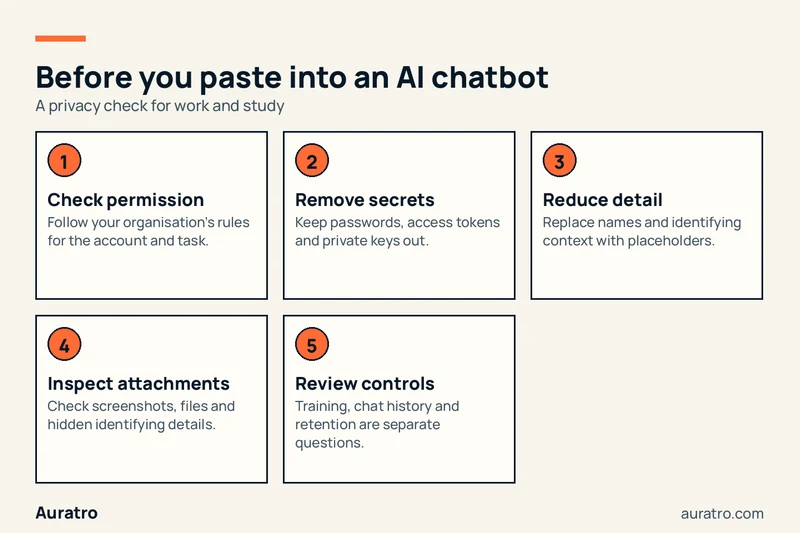
Use this sequence on text, attachments and anything visible in a screen share. It is an editorial checklist, not a guarantee that a file is anonymous or a substitute for your organisation’s policy.
- Identify the job: write down the output you need, such as a summary structure or feedback on tone.
- Check permission: establish whether this tool, account and category of information are approved for the task. If not, stop.
- Remove secrets: delete credentials, codes and private links from the material you plan to share.
- Reduce detail: replace names, contact details and specific organisations with consistent placeholders; remove facts the task does not need.
- Inspect the entire input: look at filenames, screenshots, comments and surrounding text as well as the passage you selected.
- Check the account’s privacy controls and the recipient of any connected tool; if you cannot establish that the remaining material may be shared, use a fictional example instead.
Distinguishing an account approved by an employer from a personal account matters. According to OpenAI’s consumer data guidance, business and managed-workspace data are handled differently from personal consumer data. An organisation’s approval may apply to one workspace and purpose only; do not assume it covers a personal account or every type of record.
Worked example: ask about tone without sharing the email
Imagine an internal message asking a team to move a project deadline. The original includes a client’s name, a contract reference, a precise date and a reason tied to a private commercial negotiation. The desired task is narrower: make a request sound courteous and clear. Those identifying details are not needed to practise that wording.
Illustrative example written by Auratro, not a recorded chatbot answer:
Rewrite this fictional message to sound courteous and direct.
Keep the request and do not add facts.
Hello team, can we move the project review to a later date? Please tell me which alternatives work for you. ```
If the relationship between two people matters to the task, use consistent labels such as [team lead] and [colleague], rather than real names. Read the result before using it: the assistant may change the intended meaning or add a promise. The five-part prompt template can help specify the task and constraints without supplying the original message.
Redaction means removing or obscuring information; it is not the same as proving anonymity. Names are only one possible clue. A rare role, exact incident and location can point back to someone together. If those details are necessary to obtain a useful answer, that is a reason to stop and seek an approved route, not to assume a placeholder has solved the problem.
What the privacy controls actually change
Model training means using data to improve a model. Chat history is the visible record of conversations, while retention concerns how long a provider keeps data. These are related but distinct. According to OpenAI’s data-controls page, turning off Improve the model for everyone does not delete or hide saved chats. It also says archiving a chat does not change the model-improvement setting.
As of the check date, OpenAI says a temporary ChatGPT chat stays out of history, does not create or update memories, and is not used to improve its models while it remains temporary. OpenAI may retain a copy for up to 30 days for safety. Saving that temporary chat turns it into a regular chat. These statements describe that product’s documented behaviour, not a promise that every temporary mode works the same way.
Google says a subset of Gemini Apps chats is reviewed by people to improve services and support safety. Its privacy hub advises users not to enter confidential information they would not want reviewers to see. Controls and retention conditions depend on the activity and settings described there. Turning off a training option therefore should not be treated as permission to paste a restricted document.
Common mistakes and what to do instead
Mistake: removing only the name. A job title, precise date and unusual incident can still identify a person in combination. Replace or generalise those details too, and keep the original outside the chatbot. If the context is indispensable, use an approved service or obtain permission first.
Mistake: checking typed text but ignoring the attachment. Google’s privacy notice lists files, photos, videos and shared screen or page content among information supplied to Gemini Apps. Review the whole attachment, including visible background details and comments, before sharing. Cropping a screenshot can help, but inspect the resulting image and avoid assuming that editing has removed every hidden detail.
Mistake: treating a setting as a confidentiality agreement. OpenAI describes limited authorised human access to consumer content for specified purposes, including safety and support. A training choice answers a different question from who may access content or what your organisation permits. For a wider choice between running a model on your own computer and using a hosted service, see local versus cloud AI.
Limits and what to check
This method reduces the amount shared; it cannot prove that a person cannot be identified or that an output is accurate. A local model may change where processing happens, but you still need to consider the software, storage and any connected services. For a consequential task, check the answer against an authorised source and keep a human responsible for the final decision.
Before using real material, verify the current provider terms, account and workspace settings, retention rules, connected services and your organisation’s policy. If the input was already sent by mistake, follow your organisation’s incident process promptly; deleting a chat should not be assumed to erase every copy immediately. OpenAI documents exceptions to its consumer chat deletion timeline, including security and legal reasons.
Sources & further reading
Written by the Auratro desk with AI assistance and checked against the sources listed above before publication. See how we work, or report an error. Editorial policy · Contact