Write clearer AI prompts with a five-part template and examples
Turn a vague request into a usable brief, then check the answer against your source material and constraints.
In this article
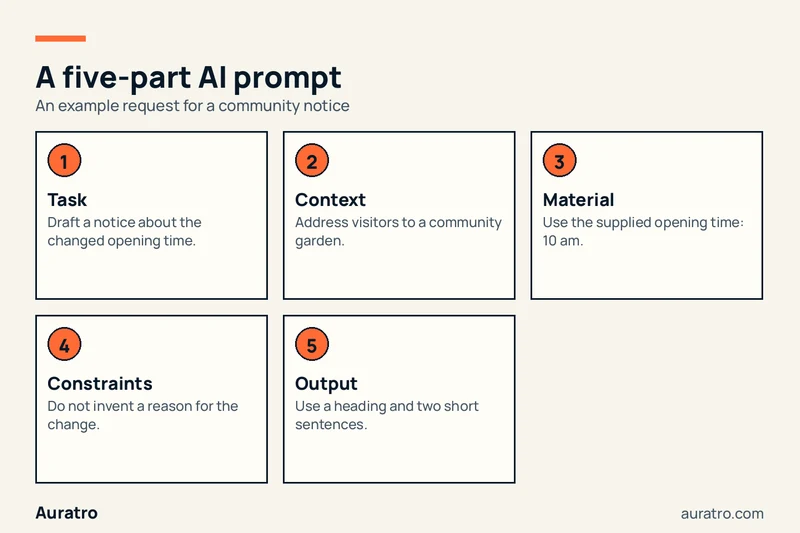
‘Write a notice’ leaves an AI assistant to guess the audience, the facts and the length. A clearer request can give it those details in five parts: task, context, material, constraints and output. The structure is a practical checklist, not a command that guarantees a correct answer.
This guide combines advice from OpenAI and Anthropic with an example you can adapt. Their pages describe prompting for their own models, and behaviour can differ between tools and versions. Confirm product-specific guidance on the official page for the tool you use; the method below does not depend on a particular menu or paid plan.
The five parts of a useful brief
A prompt is the instruction and information you give an AI model. Start with the job: an action such as ‘summarise this note’ tells the assistant what to do. Context explains who the result is for and why it is needed. According to Anthropic’s prompting guidance, explaining the purpose of a request gives Claude useful context, while explicit instructions and output constraints help specify what you want.
Material is the information the assistant should work from, such as a notice or a set of notes. Constraints are boundaries, such as using only supplied facts. Output describes the shape of the answer: a table, a paragraph or a list. OpenAI’s API guidance recommends specifying the outcome, length, format and style, and separating instructions from context with markers. These five labels are Auratro’s way of organising those ideas; neither vendor requires this exact template.
| Part | Question to answer | Example |
|---|---|---|
| Task | What should it do? | Draft a notice. |
| Context | Who is it for? | Visitors to a community garden. |
| Material | Which facts should it use? | The garden opens at 10 am on Saturday. |
| Constraints | What boundaries apply? | Use only the supplied facts. |
| Output | What should the answer look like? | A heading and two short sentences. |
Not every request needs a long brief. If you only want alternative headings, a sentence may be enough. For a summary that must preserve specific facts, the material and boundaries deserve more space. A longer input also takes up more of the model’s available context; our guide to AI tokens and answer length explains the units involved.
Copy the template
Replace the bracketed placeholders with your own details. Delete a part only when it genuinely adds nothing: for example, a brainstorming task may not have a source document. The markers around the material make it easier for a reader to see which text is input and which text is an instruction. OpenAI’s help page uses separators for this purpose; Anthropic also describes using labelled tags to distinguish sections.
Task: [Action and subject.]
Context: [Audience and purpose.]
Material:
---
[Paste the relevant facts or text.]
---
Constraints: [Boundaries, including what to do if information is missing.]
Output: [Format, length and tone.]
The labels are ordinary words, not special syntax. You can use other clear markers as long as the beginning and end of the material are obvious. Before pasting anything, remove information you are not authorised or comfortable sharing and consider the service’s data settings. If the source is long, include the relevant passage and enough surrounding context to preserve its meaning.
Before and after: a garden notice
Imagine you need a short notice for visitors. The only confirmed fact is that the community garden opens at 10 am on Saturday. These prompts are examples written by Auratro; they are not records of a product test. The first request leaves the assistant to infer what changed and what information belongs in the notice:
Write a notice about the garden.This revised version turns those guesses into instructions. It supplies the fact and explicitly asks the assistant to identify missing information instead of making up a reason. The requested length and audience also give you concrete things to check in the answer:
Task: Draft a notice about the garden opening time.
Context: It is for visitors to a community garden.
Material:
---
The garden opens at 10 am on Saturday.
---
Constraints: Use only the supplied fact. Do not invent a reason for the time. If another detail is needed, say what is missing after the notice.
Output: A heading and two short sentences in a friendly, plain tone.
The revised prompt gives the assistant a narrower job, but it does not prove that its answer will follow every instruction. Check that the notice says Saturday and 10 am, does not invent a cause, and uses the requested format. If the notice implies the garden opens at that time every day, correct it. If the date or location matters to visitors, obtain those details before publishing rather than guessing.
Check and improve the answer
Use the same five parts to diagnose a weak response. Compare the answer with your actual brief, not merely with how fluent it sounds. OpenAI’s prompt engineering guide recommends evaluating prompts as you iterate, and its help page suggests examples to demonstrate a desired format. For a repeated task, keep a small set of representative inputs and compare the answers against the same criteria.
- Check the task: did the answer produce a notice, summary or comparison, as requested?
- Review the context: would the intended reader understand it without missing background?
- Check the material: compare names, times and claims with the supplied text; mark anything unsupported.
- Inspect the constraints: look for invented details, omissions and conflicting instructions.
- Check the output: count the requested items and inspect the format and tone.
- Revise the part that failed, then compare the new answer against the same source and criteria.
Change the instruction that addresses the failure. If an answer is too long, replace ‘keep it brief’ with a specific length. If it uses unsupported details, explicitly ask it to use the supplied material and flag gaps. When the format keeps drifting, add a small, clearly labelled example of the format you want. Anthropic recommends relevant examples and clear formatting; OpenAI’s help page likewise illustrates output formats with examples.
Common mistakes and what to do instead
Mistake: treating a role as the whole task. ‘Act as an editor’ does not say what text to edit or how the result will be used. Add the passage and the change you need. A role can supply context, but it cannot replace the facts that only you have. For a longer workflow, keep each instruction tied to a specific deliverable.
Mistake: asking for certainty where evidence is missing. ‘Be accurate’ is a useful aim, but it does not supply a missing date. Ask the assistant to identify missing information, then verify any factual claim yourself. Mistake: giving conflicting limits. A request for a complete detailed report in one sentence may force a trade-off. Decide which requirement matters and revise the other.
Mistake: assuming a polished answer is a checked answer. A tidy table can still contain an unsupported value. Compare each important entry with the original material. If you need an explanation rather than a table, say so. Browse more practical AI guides for related ways to structure a task.
What to do with this
Save the five labels in a note and use them for the next request that has a definite audience or source. For a meeting summary, the task could be to extract decisions; the material would be the notes you are permitted to share. An output rule might request a decision list followed by unresolved questions. Ask for missing owners to be marked as unknown, rather than assigned by inference.
After checking the result, save the revised prompt alongside your criteria, not alongside an assumption that it works for every task. If a different document has different terminology or a different audience, update the context and material. The purpose of the template is to make those choices visible and easy to change.
Limits and what to check
These are general writing techniques, not a guarantee of factual accuracy or instruction following. OpenAI’s guidance concerns its API models, while Anthropic’s describes Claude; a different model, interface or version may respond differently. Features and data settings can also vary by product and plan. Check the relevant official documentation and privacy settings before using sensitive material.
A request to use only supplied facts can still produce an unsupported claim. Check important details against the original source, and get missing facts from someone or something authorised to provide them. For a public notice, verify the time and day with the organiser before sharing the final text.
Sources & further reading
Written by the Auratro desk with AI assistance and checked against the sources listed above before publication. See how we work, or report an error. Editorial policy · Contact