
Practical AI tutorials, tool guides and workflowsENGLISH EDITION
Stay curious. Make something useful.
Auratro
Auratro/Guides

How AI tokens affect your costs and answer length

A practical explanation of input, output and context limits, with a worked API cost example and a checklist for avoiding misleading estimates.
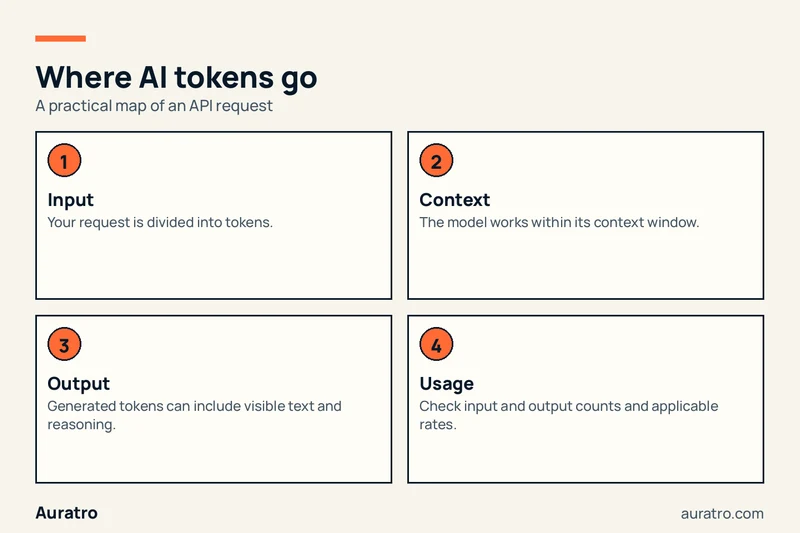
Diagram showing input tokens, the context window, output tokens and usage in an AI request.
Diagram by Auratro
In this article

Paste a long document into an AI tool and two questions follow: will it fit, and what will the answer cost? Tokens help answer both. They are the units a model processes, but they are not the same as words. A token-based API bill can depend on how much you send and how much the model generates.

This guide separates those counts from the model's context window and output limit. It also shows how to estimate a bill without confusing an imagined price with an actual one. If you use a consumer chat subscription instead of an application programming interface (API), check its own terms: the API arithmetic below does not establish your subscription charge.

What a token counts

According to OpenAI's token guide, a token may represent a character, part of a word, a whole word or punctuation. Spaces and capitalisation can change how text is divided. Tokenisation is the process of making those units; a tokeniser is the tool that performs it. The same text can produce different counts with different models, encodings or languages.

OpenAI offers a rough English estimate: 100 tokens correspond to about 75 words. That makes 1,000 tokens roughly 750 English words, but this is a planning approximation, not a conversion rule. A different language, code or unusual spelling can produce a different ratio. OpenAI's tiktoken repository explains that its byte-pair encoding often represents common word parts as units, without promising a fixed split for every word.

Input, output and the space between them

Input tokens are supplied in a request; output tokens are generated by the model. OpenAI notes that a complete API request can also include message structure, tool definitions, schemas, images or files, so counting only the pasted text may miss part of the input. Some reasoning models use internal reasoning tokens that are not displayed as answer text; OpenAI says those count towards output usage for its models.

A context window is the amount of tokenised material a model can work with in a request. The maximum output is a separate limit on generated tokens. According to OpenAI, both limits vary by model, and reasoning models need room for reasoning as well as visible text. A large context window therefore does not guarantee an equally long visible answer. Ask for the format you need, then check the model's actual limits.

TermWhat to checkWhy it matters
InputThe full request, not only the documentInstructions and request structure can add tokens.
Context windowThe selected model's limitAn oversized request may need to be shortened or split.
OutputThe model's cap and reported usageVisible text may not account for all generated tokens.
PriceThe applicable rate for each usage categoryInput and output rates can differ.

For a long source, remove duplicated material or divide it into smaller pieces before asking for a synthesis. Keep the question and the passages needed to answer it together. The more guides section has other practical explanations, and tutorials covers task-oriented workflows.

A worked API cost example

Imagine an API request reports 2,000 input tokens and 500 output tokens. For arithmetic only, suppose the provider charges £2 per million input tokens and £8 per million output tokens. These are invented rates, not a quote from any provider. There is no cached input or separate tool charge in this example. Multiply each count by its own rate, then divide by one million.

UsageCalculationIllustrative cost
Input2,000 × £2 ÷ 1,000,000£0.004
Output500 × £8 ÷ 1,000,000£0.004
Total£0.004 + £0.004£0.008

The output is one quarter of the token count but half the illustrated cost because its assumed rate is four times higher. If the actual counts or rates differ, the total changes. OpenAI says input, cached input and output can have different rates, and other capabilities can use different billing units. Check the provider's current pricing and usage record before treating the estimate as a bill.

Why answers can be shorter than expected

A request for a long answer is an instruction, not proof that the model can generate that much. OpenAI's response-length documentation distinguishes an output token cap from a prompt asking for a particular length. As of 22 November 2026, it identifies max_output_tokens for its Responses API and says there is no minimum tokens setting. Confirm the current endpoint and model documentation before using a setting.

A restrictive output cap can leave too little room for the requested response. Conversely, raising a cap sets an upper bound; it does not promise a particular length. For a reasoning model, some output usage may be internal rather than visible. If a response is too short, inspect the cap and usage, then ask for a narrower section or a specified word count. Check the result rather than assuming the requested word count was met.

Common mistakes

Treating every token as a word. OpenAI's English estimate is useful for rough planning, but the exact split depends on the text and encoding. Counting a document's words alone cannot tell you the exact request count or its final output usage. A tokeniser gives a more relevant count than a fixed words-to-tokens multiplier.

Using one provider's counter for another provider's model. Anthropic's own token-counting guidance says counts are model-specific and recommends its counting endpoint with the model intended for inference. It explicitly warns against using OpenAI's tiktoken to estimate Claude counts. OpenAI's repository describes tiktoken as a tokeniser for OpenAI models. Use the counter intended for the model you will call.

Equating a short answer with a cheap request. A long input still contributes to usage even if the response is brief. On OpenAI reasoning models, output usage can also include reasoning that is not visible. Compare the returned usage categories and applicable rates, not just the length of the answer on screen.

What to do with this

Before sending a large API request, identify the model and count the complete input with its provider's method. Check its context window and output cap, then leave room for the response and any reasoning. For OpenAI's Responses API, the documented input-token counting API includes request formatting; OpenAI says an input count does not predict generated output.

Afterwards, inspect the usage information returned by the API and apply the rates for the relevant categories. Keep a small sample of representative requests and compare their actual usage with your estimates. If you revise a document, count both versions with the same model-specific method; Anthropic's guidance suggests subtracting the two counts to see the input difference.

Limits and what to check

This is a guide to token-based API usage, not a universal price list. Subscription products, plans, providers and endpoints can have different limits and billing rules. Prices, model availability and settings change. As of 22 November 2026, the linked OpenAI and Anthropic pages describe the methods above; confirm current model documentation and pricing before committing to a workload.

A count made before generation cannot tell you exactly how much output will be produced. The hypothetical calculation also excludes cached-token rates and any separate service charges. For a real estimate, include the complete request, likely output, every applicable rate and any other billed capability; reconcile it against the provider's usage report.

Sources & further reading

Understanding and counting tokens

Controlling the length of OpenAI model responses

OpenAI tiktoken repository

Anthropic token counting guidance

From Auratro Editorial

Written by the Auratro desk with AI assistance and checked against the sources listed above before publication. See how we work, or report an error. Editorial policy · Contact
Keep reading

NEXT STORY Guides

What MCP lets an AI assistant do and how to check access

Follow a document lookup from request to result, then use a checklist to judge a connection before allowing it to act.

Auratro EditorialOpen this article
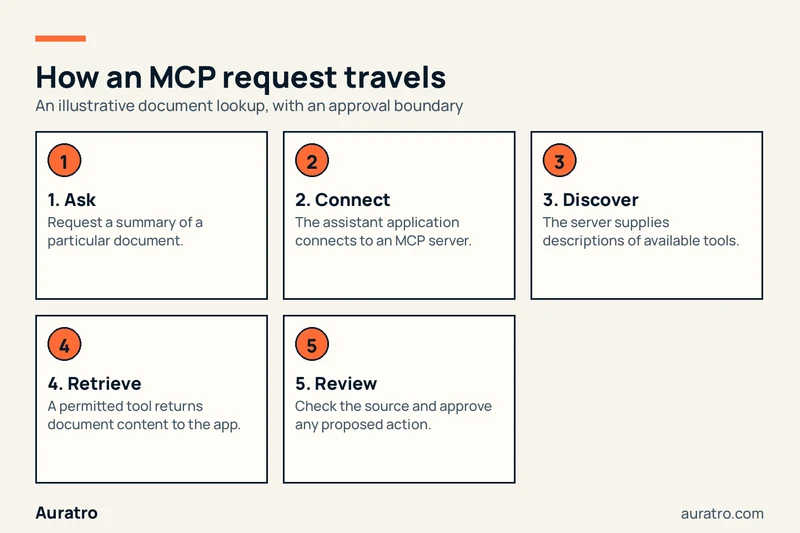
Five steps in an illustrative MCP document lookup, from a request to checking the result and proposed action.
Diagram by Auratro

You ask an AI assistant to summarise a document stored in another service. Without a connection to that service, the assistant may only know the text you paste into the chat. With a suitable connection, it may be able to retrieve the document itself. Model Context Protocol, or MCP, is one way an application can arrange that connection.

MCP provides a shared way for an AI application to communicate with a server that exposes capabilities. It does not give every assistant access to every file or guarantee that an action is safe. The examples below explain the mechanism rather than a particular product setup. Interfaces and permissions change, so check the official documentation for your application before connecting a service.

The parts of a connection

Think of the assistant application as the place where you ask a question. It acts as a host: the application manages the conversation and connections. An MCP client is the part that communicates with an MCP server. The server presents capabilities from a data source or service in a form the application can use. A server can run locally or remotely; the word server describes its role, not necessarily a machine in a distant data centre.

According to OpenAI's documentation on MCP servers, an application can import a server's available tools and let a model request calls to them. A tool is a named operation with inputs and a result. It could search documents or create an item, depending on what its operator provides and what the account permits. For the wider distinction between answering and acting, see how an AI agent differs from a chatbot.

What can cross the connection

Support varies across applications and servers: As of 29 November 2026, Anthropic's MCP connector documentation says its Messages API connector supports tool calls, rather than the entire MCP feature set.

CapabilityWhat it providesExample
Search toolFinds information in a serviceSearch a document collection
Read toolRetrieves available informationRead a selected document
Write toolRequests a change in a serviceCreate a task

A server need not offer every kind of tool, and an application need not enable every tool a server offers. Even a tool labelled as a search may return sensitive text to the assistant application. A tool that changes data has a different consequence: it may create, update or delete something. Read the actual description and permissions instead of assuming a connection is read-only.

A worked example: summarise a project note

Imagine an assistant connected to a document service through an MCP server. You ask: ‘Summarise the launch checklist in the project note and identify anything still undecided.’ This is an illustrative example written by Auratro, not a recorded interaction. The server in this example offers a document search tool and a separate tool to create a task. Other servers may offer different operations.

The application first makes the server's tool descriptions available to the model. The model can request a search using a title or other input; the application sends the call to the server and receives a result. If the returned text contains the relevant note, the assistant can use it to draft a summary. OpenAI's documentation describes this sequence of listing tools, making calls and receiving results in its API implementation.

Suppose the note says a release date is undecided. A useful answer should preserve that uncertainty and identify the note it used. If the assistant proposes creating a task, that is a separate action from reading the note. Ask to see the task title and destination before approving it. A tool result can be incomplete or refer to an outdated note, so compare the answer with the original. The same principle appears in our five-step check for AI hallucinations.

A checklist before you connect

Use this decision checklist for a connection you are considering. It is a method for evaluating access, not a claim that every product displays the same controls. You may need to consult the connection provider or your organisation's administrator for the details.

  1. Identify the provider and destination. Find out who operates the MCP server and which service or account it will reach. Prefer a server you can identify and trust.
  2. Inspect the requested access. Look for the data it can read and whether it can create, change or delete items. Limit access to what the task needs when the product permits it.
  3. Inspect the available operations. Separate information retrieval from actions that change something or send data elsewhere. A tool name alone is not a complete security review.
  4. Decide how approval works. Find out whether the application asks before a call or a consequential action, and review the actual request before accepting it.
  5. Check a small result. Start with a low-stakes document, ask the assistant to identify its source, and compare the answer against that document.
  6. Revisit access afterwards. If the connection is no longer needed, use the service's available controls to remove it and review any remaining permissions.

OpenAI recommends connecting only to trusted servers and reviewing data shared with them. Its documentation also describes approval controls for MCP tool calls in its API. Anthropic documents tool allowlists and denylists for its connector. These are examples of controls in particular implementations, not promises about every assistant. For sensitive material, apply a chatbot privacy checklist before sharing the document or connecting its storage.

Common mistakes and myths

‘MCP means the assistant can access everything.’ No. A connection supplies particular capabilities and access depends on the server, account and application. A server might expose a document search but no task creation. Even if a task tool exists, its permitted scope depends on the connected account and configuration. Ask what it can actually reach before relying on it.

‘A connected source is an instruction I should obey.’ A document is evidence for the task, not an authority to change the task. OpenAI's agent safety guidance describes prompt injection: untrusted content can try to redirect an assistant's behaviour. For example, a retrieved note might contain instructions to share other files. Treat that as suspicious content in the note, not permission from you to share anything.

‘A successful call proves the answer is correct.’ A tool can return the wrong match, an old version or information that the assistant summarises badly. Confirm the document's identity and check important details in the source. A connection makes retrieval possible; it does not independently verify the truth of the material returned.

What to do with this

Choose one recurring question that needs information from a specific service, such as finding a project note. Write down the exact information needed and the action, if any, you want the assistant to take. A read-only lookup is a useful first scenario because its desired result is easy to compare with the source. Keep any write or message as a distinct decision.

Then use the checklist above to assess the available connection. If you cannot identify the operator, access scope or approval behaviour, leave the connection off until you can. When a result arrives, look for the document name and compare the answer with the original. That gives you a repeatable way to assess both the connection and the assistant's handling of the information.

Limits and what to check

MCP is a protocol, not an assurance that a particular service has a compatible server, that a host supports every capability, or that a model will select the right tool. Anthropic's documented connector, for example, supports tool calls and requires a remotely accessible HTTP server; another host can have different requirements. Server features, permissions and interfaces can change between versions and accounts.

Before using a connection for real work, verify the current provider, available tools, data access and approval controls in the documentation for your own application and server. An approval screen is useful only if you understand the requested action and destination. If the returned source is incomplete or uncertain, resolve that before using its summary to make a consequential decision.

Sources & further readingMCP servers | OpenAI APIMCP connector | Claude Platform DocsSafety in building agents | OpenAI API
NEXT STORY Tutorials

How to proofread and tighten writing with AI while keeping your voice

Use separate editing passes, a reusable prompt and a side-by-side check to keep control of your words and meaning.

Auratro EditorialOpen this article
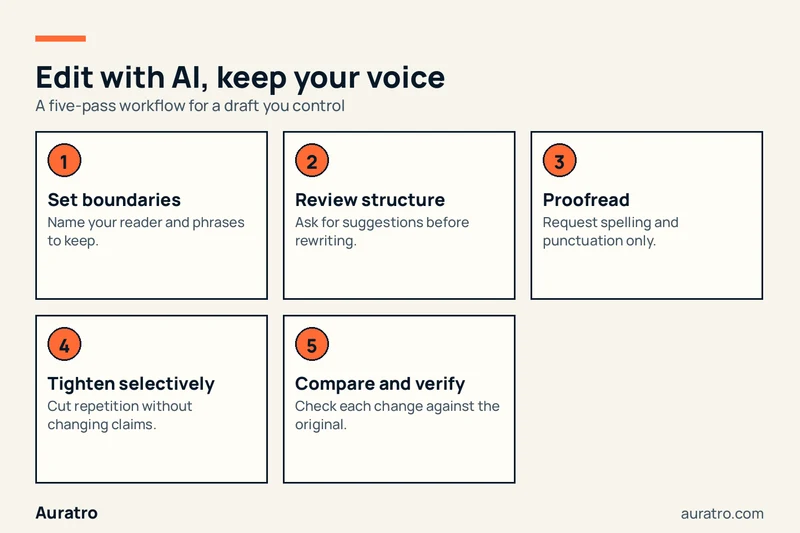
Five steps for editing writing with AI, from setting boundaries to comparing changes
Diagram by Auratro

A polished rewrite can be less useful than the messy original if it changes a promise or removes the phrase that sounds like you. To proofread with AI while keeping your voice, ask for a narrow edit, inspect the proposed changes and make the final choices yourself. Work on structure, errors and concision in separate passes.

This method adapts guidance from Google and Anthropic into a reusable editing routine. It works with a text-based AI assistant; the examples below are instructions you can adapt, not a record of a product test. Interfaces and data policies vary, so check your chosen tool's current guidance before sharing a draft.

Decide what must stay yours

Voice is the pattern of choices that makes a piece sound like its writer: word choice, rhythm, level of formality and the way it addresses readers. Choose two or three traits you actually want to keep, such as conversational sentences and a dry aside. Mark a phrase that carries your meaning or sounds distinctly like you. These are editing instructions, not a guarantee the assistant will follow them.

Tell the assistant who will read the piece and what you want the reader to do. Google's technical writing guidance recommends identifying an audience, document type and goal in a prompt. Anthropic's Claude Opus 4.8 guidance suggests specifying a desired tone and revisiting style instructions when model behaviour changes. A short sample of your own writing can demonstrate the tone you want, provided you have permission to share it.

Keep a separate copy of the original. That gives you a reference when an edit sounds smoother but quietly changes a qualification. If the draft contains private material, remove it or use an approved tool; the chatbot privacy checklist helps you decide what to leave out.

How to edit in five passes

The workflow below is an editorial method built from the sources, not a product-specific menu tutorial. Open a text assistant of your choice and use its normal message field. Google recommends dealing with organisation before grammar and style; its guide also warns that generated responses can contain errors. Apply the following steps to a short section first.

  1. Save an untouched copy of the draft. Identify its audience, purpose and any wording, claims or qualifications that must stay.
  2. Ask for an organisation review. Request a list of confusing transitions or misplaced paragraphs, without a rewrite. Decide which suggestions fit your purpose.
  3. Request a proofreading pass for spelling, punctuation and grammar only. Ask for each proposed correction with its reason, so you can reject a change that is deliberate.
  4. Ask for a separate tightening pass. Request specific cuts to repetition and wordy phrases, while preserving the meaning, tone and marked phrases.
  5. Compare each suggestion with the saved original. Check numbers, names, negations and qualifications, then accept, revise or reject the change yourself.

For a long document, repeat the passes on manageable sections and then read the whole piece for continuity. A paragraph can make sense alone while a transition fails in context. The five-part prompt template offers another way to spell out the task, context and desired response.

A prompt you can adapt

Use this example after replacing the bracketed parts. It asks for suggestions rather than automatic acceptance, and separates the text to edit from the instructions. Anthropic suggests specifying a desired tone for Claude Opus 4.8; Google suggests constraining an assistant to information supplied by the writer. Neither instruction guarantees compliance, so review the result.

Help me edit a [document type] for [audience]. The reader should [goal].

My voice is [two concrete traits]. Keep these phrases: [phrases]. Preserve all claims and qualifications. Do not add facts.

First, list up to three structural concerns without rewriting. Then list spelling, grammar and punctuation suggestions separately. Finally, suggest specific cuts to repetition. For each suggestion, show the original, the proposed change and a brief reason. Flag anything whose meaning is unclear instead of guessing.

Draft: [paste a short, shareable section] ```

The prompt groups three requests in one message, but you can send them separately if the response mixes them together. For a strictly mechanical proofread, remove the structure and tightening requests. If a suggested edit sounds unlike you, describe the problem precisely: for example, ask to keep contractions or retain the original sentence order.

Worked example: shorter without a stronger claim

The following passage and edits are illustrative examples written by Auratro, not recorded answers from an AI tool. Imagine a community organiser writing to volunteers: ‘We are hoping to possibly open the garden on Saturday, if the weather allows us to do so.’ The message has a clear condition and expresses a hope, not a confirmed opening.

A useful proposed cut is: ‘We hope to open the garden on Saturday, weather permitting.’ It removes extra words while keeping the hope and the weather condition. A risky edit would be: ‘The garden opens on Saturday.’ That version drops both uncertainties. It is shorter, but it makes a different promise. Reject it unless you have independently confirmed the opening.

Now consider voice. If the writer normally says ‘if the weather holds’, that phrase may feel more natural than ‘weather permitting’. A possible final sentence is: ‘We hope to open the garden on Saturday, if the weather holds.’ The author chooses it; the assistant's phrasing is only a proposal. Google’s short-sentence guidance recommends removing unnecessary words and focusing sentences on one idea, but brevity is not a reason to discard meaning.

Common mistakes to catch

A request to ‘make this professional’ leaves the desired tone open to interpretation. Name the intended audience and give a concrete description instead, such as ‘friendly and direct, with contractions’. Also avoid asking for a complete rewrite when you only need corrections: request a list of changes so you can inspect the original wording beside each suggestion.

Watch for changes to small words. ‘May’ can become ‘will’; ‘some’ can become ‘all’; a negative can disappear. Check any quotation against its source and every number against the record from which it came. Google warns that model responses can introduce mistakes and advises checking both factual errors and passages that do not feel right. A fluent sentence is not evidence that its claim is true.

Do not treat every long sentence as an error. A deliberate rhythm, qualification or example may earn its space. Google's guidance is aimed at technical writing and suggests shortening sentences and removing unnecessary words; a personal essay or fictional dialogue may need different rhythms. Read the edited passage aloud and restore wording that better serves the reader.

Limits and what to check

A prompt cannot ensure the assistant preserves voice, keeps facts unchanged or identifies every error. Its suggestions are a starting point for judgement. Compare the final version with the saved original, verify factual claims against reliable sources and read the whole piece for missing context. Ask a human reader for a second opinion when the stakes or audience warrant it.

Privacy controls, retention policies, available features and interfaces differ across services and plans and can change. Check the official documentation for the service and account you use before submitting material. If you cannot share a document, apply the same checklist yourself to an anonymised passage or keep the editing offline.

Sources & further readingUsing large language models in technical writingPrompting Claude Opus 4.8Short sentences