Local vs cloud AI models: a practical comparison for choosing where to run
Compare privacy, memory, cost and response time with a checklist for your own workload. A model running in a desktop app is not necessarily running on your computer.
In this article
You have a document to summarise and a choice: run a model on your computer or send the request to a hosted service. Local AI can keep the model's computation on your hardware, while cloud AI shifts that work to a provider. The practical choice depends on where the data travels, what your machine can hold and whether the answers are good enough for the task.
This comparison uses official documentation checked on 25 November 2026, plus a method for assessing your own workload. Features, prices and data terms change, so confirm the current details for the exact app, model and plan before choosing. The guide to running Ollama locally covers a starting route if local execution fits.
What local and cloud actually mean
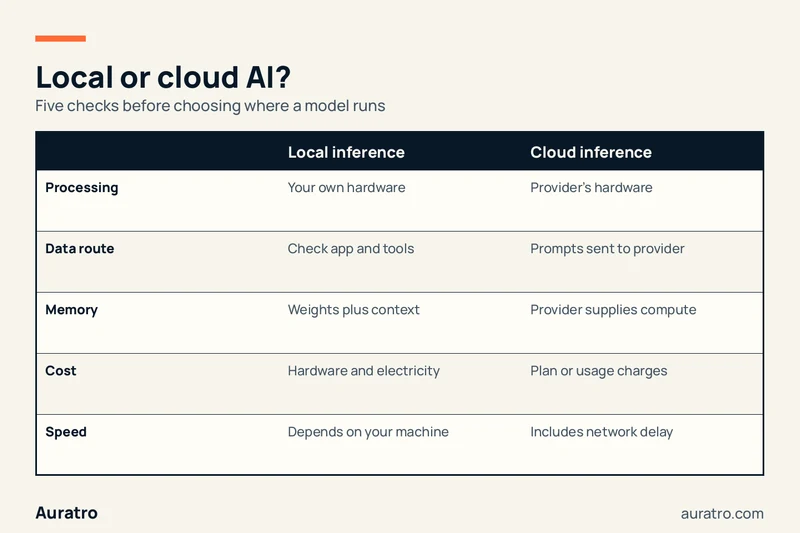
Inference is the computation a trained model performs to produce an answer. With local inference, that computation happens on a device you control. With cloud inference, it happens on a remote provider's infrastructure. A browser or desktop interface alone does not tell you which route is in use. Ollama's cloud documentation says its cloud models can be called from the Ollama app, command line or local API, even though inference runs on its cloud service.
A model is a set of learned numerical weights used by software to generate an output. The same general task can be performed by different models, and the route alone does not guarantee comparable answers. For a fair decision, identify both the particular model and the application around it. A local model may be paired with a tool that sends a search query elsewhere; a cloud service may offer controls for how it retains requests.
| Question | Local model | Cloud model |
|---|---|---|
| Where is inference? | On your hardware | On the provider's hardware |
| What must fit locally? | Model weights and working memory | Usually just the client application |
| Main costs to compare | Hardware, power and upkeep | Subscription or usage charges |
| Data boundary | Inspect the app, logs and connected tools | Inspect provider and third-party data terms |
| Waiting time | Depends on model and device | Includes network and service time |
Privacy is a data-flow question
Running inference locally can keep the text sent to that model on your device, but it does not prove that the whole workflow stays there. Look at the application, any web search or connected service, saved conversation files and backups. Ollama distinguishes local models from cloud models and says cloud features can be disabled. That distinction matters even when the same interface offers both choices.
A cloud provider's training policy and retention policy are different questions. OpenAI's API data controls say abuse-monitoring logs may contain prompts and responses and are retained by default for up to 30 days, subject to stated exceptions. Eligible customers can apply for different controls. That is an example about the OpenAI API, not a rule for every cloud product or for every ChatGPT plan. Read the terms for the exact service and features you use.
Before using sensitive material, map the route from the input through the model, any external tools and the saved output. Decide who can access each location and how long it is kept. Removing unnecessary names or replacing them with placeholders can reduce what you expose during a comparison. Local storage still needs protection: anyone with access to an unprotected device or its backups may be able to read saved files.
Hardware, memory and the speed trade-off
A local model needs storage for its files and working memory to run. A graphics processing unit, or GPU, can accelerate suitable workloads; its video memory is often called VRAM. System RAM may also be used. Ollama's FAQ says ollama ps shows whether a loaded model is in GPU memory, system memory or split between them. That is a useful observation about placement, not a promise of a particular speed.
Quantisation represents weights with fewer bits to reduce memory needs. Hugging Face estimates that the weights of an 8-billion-parameter model need about 16 GB in its bfloat16 example, roughly 8 GB at 8 bits and 4–5 GB at 4 bits. Those figures are for weights, not the entire application. Its documentation also says quantisation methods trade memory against speed and accuracy, so a smaller file is not automatically a better answer.
The context window is the amount of text a model can work with at once, measured in tokens. Ollama says increasing context length increases the memory needed. A model whose weights appear to fit may therefore struggle with a longer document or other running applications. The context window guide explains why a long conversation can exceed that working space.
Cloud inference moves model execution off your device, which can avoid buying a larger GPU for that model. It still depends on the connection and the service. Local speed depends on the model, available memory and hardware; cloud waiting time includes the network and service. Neither route is inherently faster for every task. Compare time to the first useful text and time to a complete answer on your own representative input.
Costs to put on the same page
For local use, list the equipment you already have separately from any proposed upgrade. Add electricity and the time needed to install, update and maintain the software. A model with no per-request charge still uses resources. If the computer is already adequate and the workload is frequent, the incremental cost may be modest; buying hardware solely for occasional use changes the calculation.
For cloud use, distinguish a chat subscription from an application programming interface, or API, which lets software send requests to a service. Billing arrangements differ. Some APIs charge according to input and output tokens, so estimate both the material sent and the answer received. Auratro's token and AI cost explanation shows why a long input and a long response affect the calculation differently. Include any connected tool charges and plan limits in your own estimate.
Use the same period for both estimates. For example, compare a month of expected requests and power with one month of subscription or estimated usage charges. If purchasing a computer, include a sensible share of that purchase over the period you expect to use it. This is a planning exercise, not a universal break-even point: utilisation, local electricity prices and service terms change the result.
Which should you choose?
Choose a local route when keeping inference on your own hardware is a firm requirement, the full data flow has been checked and a model that fits your machine produces acceptable results. It can also suit repeat work where you already own suitable hardware. A disconnected workflow requires more than a local model label: download the necessary files beforehand and check that the rest of the application does not require a connection.
Choose a cloud route when the selected service meets your data requirements and you need a model or capability your device cannot comfortably run. It can also suit occasional use when a hardware purchase would be hard to justify. A mixed workflow is possible: process suitable material locally and use an approved cloud service for other tasks. Make that choice per task and data type, not merely per application.
A checklist for your own decision
- Pick one representative task and an input you are allowed to use with both options. Remove sensitive details for an initial comparison.
- Write down the local model, its file and precision and the cloud model and service. Record the context each option needs for the task.
- Trace where input, output, logs and connected-tool requests go. Read the relevant retention and training terms before sending real material.
- Estimate local memory with room beyond the model weights; note the available system memory and GPU memory. If using Ollama, inspect
ollama psafter loading the model. - Use the same example and instructions on each route. Record waiting time and check the answers against a reference or explicit acceptance criteria.
- Compare costs over the same period, including any hardware purchase, power, subscription and usage. Choose the route that meets the data and quality requirements within your budget.
For a worked planning example, imagine summarising the same non-sensitive meeting notes each week. Define success before comparing: every assigned action must match the notes, and missing owners must be marked as unknown. Give both candidates the same notes and instructions. Check the output against the original rather than treating a fluent summary as proof. Then compare the time and cost of the full workflow, including the correction work.
Limits and what to check
The memory figures above are examples for weights, not minimum computer specifications. Runtime overhead, context size, quantisation method and other applications affect the actual requirement. Output quality also changes with the model and prompt, so this comparison cannot predict the winner on your documents. Both local and cloud models can produce incorrect statements; verify material claims against the source.
As of 25 November 2026, Ollama's context page says a larger context uses more memory, while its local FAQ and context page describe different default context settings. Treat defaults as version-dependent instead of relying on either as a universal value. Before committing, check current model availability, hardware support, pricing, data retention and connected tools for the exact version and plan you intend to use.
Sources & further reading
Ollama cloud inference and local models
Written by the Auratro desk with AI assistance and checked against the sources listed above before publication. See how we work, or report an error. Editorial policy · Contact